
YouTube Description Extractor





Earlier, when we uploaded videos on YouTube, we would simply hit publish and wait for views to appear. But in reality, nothing really changed. The main issue was weak video descriptions, no strong keywords, no clear calls to action, and no proper SEO planning.
Like many creators, we were putting in 100% effort but missing the key factor that helps videos get discovered.
On top of that, we spent hours manually checking competitors’ videos, copying their descriptions and trying to understand what worked. The process was really slow and very easy to mess up. Instead of focusing on creating better content, most of the time went into guesswork and manual research.
If you are struggling with low reach, poor YouTube SEO, or wasting time on manual analysis, this blog will help you understand the YouTube description extractor. This simple tool lets you instantly pull any video description, learn from proven SEO strategies and optimize your own content. It saves time, removes guesswork and helps your videos rank better on YouTube and search engines.
So, let’s get started and understand more about Youtube description extractor! 👍
What Is a YouTube Description Extractor and Why Do You Need One?
A YouTube description extractor is an easy online tool that pulls the full description from any YouTube video using just the video URL. Instead of opening the video and copying everything manually, the tool instantly collects the complete text, including keywords, links, timestamps, and calls to action.
For beginners who are still learning how YouTube works, this makes research much faster and much simpler.
So why do you actually need it? See! Many new YouTubers focus only on making videos and ignore the description box. But the thing is that video descriptions play a very important role in YouTube SEO. A well-written description helps YouTube understand your content, improves your chances of appearing in search results, and can even drive traffic to your website or social links.
Without studying good descriptions from successful creators, you might miss important optimization opportunities.
That’s where the GoogieTools YouTube Description Extractor really helps. It lets you quickly analyze competitor descriptions, discover useful keywords (including long-tail ones), and learn what top creators are doing right.
Instead of wasting time on manual work, you can focus on creating better videos while using real data to improve your rankings and grow your channel faster.
Key Features of GoogieTools' YouTube Description Extractor
This tool isn’t just about copying descriptions, it’s built to make your YouTube research faster, smarter, and stress-free. It comes packed with beginner-friendly features that help you understand what’s working on YouTube without getting lost in technical stuff.
Let’s break down what makes it truly useful:
- Instant Extraction: Just paste any YouTube video URL and the tool quickly pulls the complete description within seconds. You also get helpful details like the video title and basic metadata, so you don’t have to jump between multiple tabs. It’s perfect when you want quick insights without wasting time.
- Batch Processing: Doing competitor research one video at a time can be exhausting. With batch processing, you can extract descriptions from multiple videos in one go. This is especially helpful if you’re auditing a competitor’s channel or studying trends across several videos.
- Keyword Highlighting: If you’re new to SEO, finding the right keywords can feel confusing. This feature automatically highlights both short-tail and long-tail keywords inside the description. It helps you quickly spot what keywords successful creators are using so you can apply similar strategies to your own videos.
- Editable Output: Once the description is extracted, you can easily view, edit, and copy it. Want to save it for later? You can download the file as text or CSV for deeper analysis. This makes planning and organizing your content much easier.
- Metadata Inclusion: The tool doesn’t stop at the description. It also pulls useful performance data like view count, likes, and upload date. This gives you better context about how well a video is performing and what kind of descriptions work best.
- Mobile Compatibility: Let’s say you’re on a laptop, tablet, or phone, the YouTube description extractor tool works smoothly everywhere. So even if you’re researching ideas on the go, you won’t face any issues.
- Integration with GoogieTools Suite: The biggest advantage is how well it connects with other GoogieTools features like title generators and tag extractors. Together, they create a complete YouTube SEO workflow, helping you plan, optimize, and grow your channel more efficiently.
All these features turn the YouTube Description Extractor into more than just a simple tool, it becomes a smart assistant that saves your time and helps you make better, data-driven content decisions.
How to Use GoogieTools' YouTube Description Extractor: A Step-by-Step Guide
Getting started is very simple! Even beginners can do it easily. Just follow these clear steps given below to extract YouTube descriptions smoothly:
Step1) Open the Tool >> Visit googiehost.com/tools >> Search for YouTube Description Extractor.
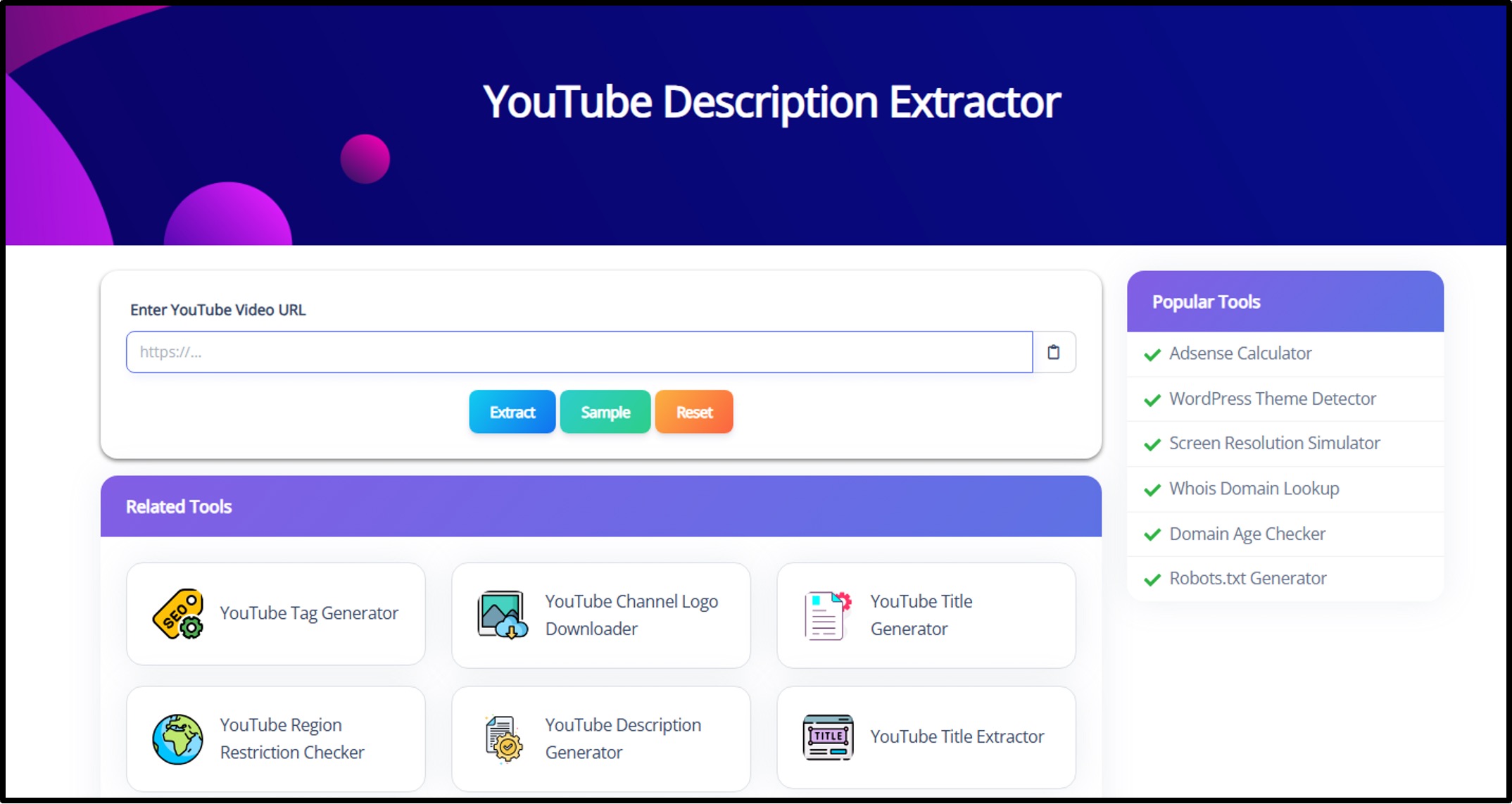
Step2) Paste the Video URL >> Copy the link of the YouTube video you want to analyze (for example, a competitor’s video) >> Paste it into the input box.
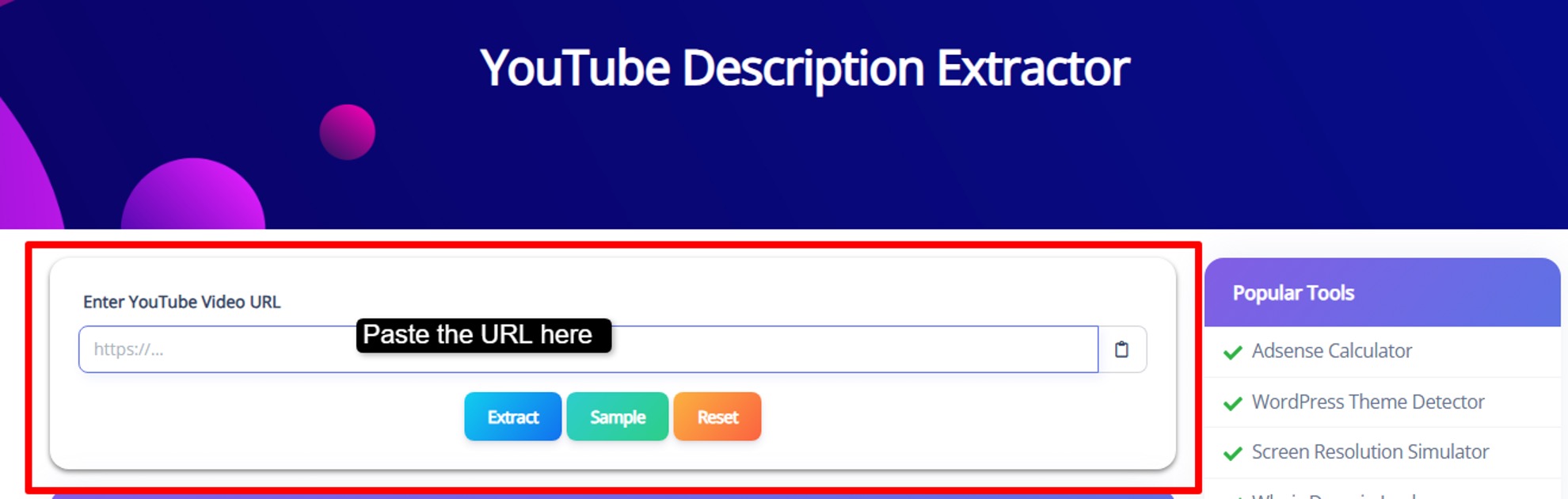
Step3) Click Extract >> Hit the extract button >> The tool will instantly pull the full video description for you.

Step4) See the Description >> Carefully read the extracted text >> Make any edits if needed, then copy or download it for your use.
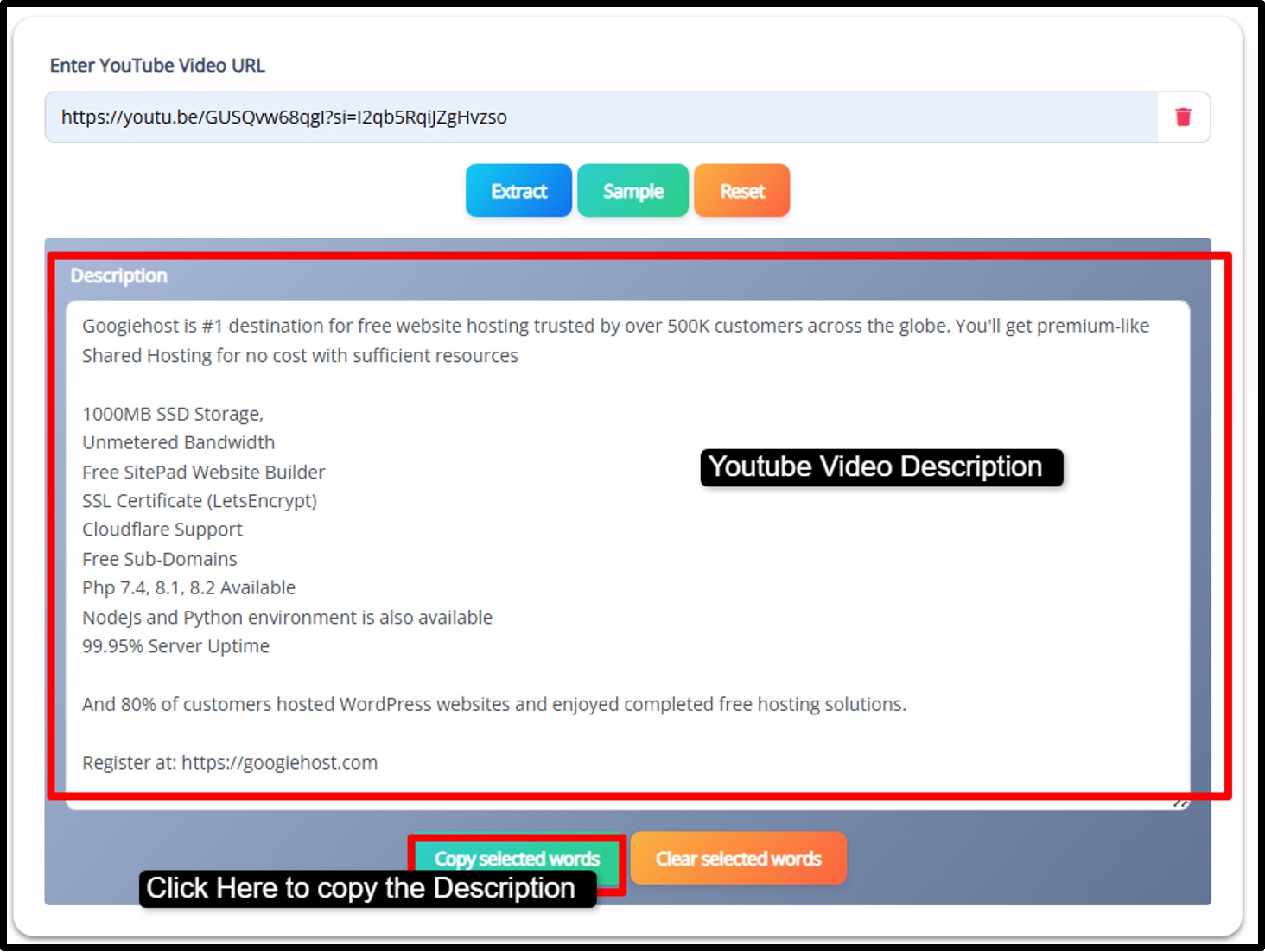
Step5) Now, use the description to improve your own video descriptions >> After publishing, see the performance in YouTube Analytics to see the results.
This simple workflow reduces manual effort and makes using a YouTube description extractor quick and stress-free.
Pros and Cons of Using a YouTube Description Extractor
No tool is perfect, so let's weigh the good and the not-so-good to help you decide.
Pros:
- Automates extraction, saving hours on manual copying and reducing errors.
- Reveals keywords and structures that boost rankings.
- Easily study rivals' strategies to improve your own content.
- No sign-up or costs, with a simple interface for all users.
- Useful for research or repurposing content across platforms.
Cons:
- Can't access private or restricted content, restricting some analyses.
- Wrong links yield no results, requiring careful input.
- Extracted text might need minor cleanup for timestamps or links.
- Basic versions lack deep metrics without pairing with other tools.
Best Practices for Extracting and Using YouTube Descriptions Effectively
If you’re new to YouTube SEO, it’s easy to feel confused about what to look for after extracting a description. Many creators either copy blindly or miss the real insights hidden inside. To help you avoid that, here are some simple, practical tips you can actually use.
- Target Top Performers: One common mistake beginners make is analyzing random low-performing videos. Instead, focus on videos with high views and good engagement. These creators are already doing something right. By extracting their descriptions, you can spot winning keyword patterns and understand what helps videos rank and get clicks.
- Combine with Other Tools: Looking at descriptions alone gives you only part of the picture. Pair the extractor with tag extractors or title generators for deeper insights. This is especially helpful if you feel stuck and don’t know why your videos aren’t ranking.
- Update Regularly: YouTube trends change fast. Keywords that worked six months ago may not work today. Make it a habit to extract descriptions from trending videos in your niche. This keeps your SEO strategy fresh and competitive.
- Optimize for Mobile Readers: Many beginners forget that most viewers are on phones. Long, cluttered paragraphs can look terrible on mobile. When you use extracted descriptions, rewrite and format them so they’re easy to read on small screens.
- Blend Keywords Smartly: New creators often use either very broad keywords or extremely long ones, both can limit reach. The smart approach is to mix short-tail keywords (like “YouTube SEO”) with long-tail keywords (like “best YouTube description extractor for beginners”). This helps you reach both wide and niche audiences without looking spammy.
- Analyze the Structure: Don’t just look at keywords! Study how successful creators make their descriptions. Notice where they place timestamps, important links, and calls to action. Many beginners struggle with engagement simply because their description looks messy or unstructured.
- Use Ethically (Very Important): It can be tempting to copy a competitor’s description word for word, but that can hurt your channel. Duplicate content may reduce trust and even trigger spam signals. Always treat extracted descriptions as inspiration, not copy-paste material. Rewrite in your own style to keep your content original.
When you follow these practices, you’re not just collecting data, you’re turning it into real growth opportunities.
Why Extraction Tools Matter?
Many new YouTubers spend hours creating videos but ignore the description box completely. That’s a big missed opportunity. Video descriptions are one of the strongest SEO signals that help YouTube understand what your content is about.
Descriptions contain the keywords that help your videos appear in YouTube and even Google search results. When you extract descriptions from successful videos, you start seeing patterns, like how creators naturally place keywords, where they add links, and how they guide viewers to take action.
These small details can make a big difference in visibility.
From real-world SEO experience, channels that study and apply these insights often see noticeable traffic improvements over time.
Long-tail keywords help you rank in less competitive searches, while short-tail keywords help you reach a broader audience. Tools like GoogieTools’ YouTube Description Extractor make this advanced research simple, even if you’re just starting your channel.
Common Mistakes to Avoid When Extracting YouTube Descriptions
Even with a good tool, newbies can make mistakes that waste time or hurt SEO. Watch out for these common issues:
- Overlooking Context: Extracting a description without checking the video’s performance can mislead you. If the video has low views or poor engagement, its strategy may not be worth copying. Always check performance metrics first.
- Keyword Stuffing: Some creators overload descriptions with too many keywords. Copying this habit can make your content look spammy and may hurt rankings. Focus on natural, readable keyword placement instead.
- Not Customizing the Text: Using extracted content without editing is risky. It can lead to duplicate content problems and reduce your channel’s originality. Always rewrite and adapt the description to match your video.
- Skipping Bulk Extraction: If you analyze videos one by one, you’ll waste a lot of time, especially during competitor research. Use bulk extraction whenever possible to speed up your workflow.
- Forgetting Privacy Settings: Sometimes the tool won’t work if the video is private or restricted. Make sure you’re extracting from public videos to avoid confusion.
Frequently Asked Questions About YouTube Description Extractors
Q1. Is it free?
Ans. Many tools have free plans, but advanced bulk extraction or formatting features may require a paid version.
Q2. Does it work for Shorts?
Ans. Yes! Youtube description extractors can pull text from both regular videos and YouTube Shorts.
Q3. Can I extract in bulk?
Ans. Some platforms allow bulk extraction from multiple videos at once, while free tools may limit you to one video at a time.
Q4. How does it boost SEO?
Ans. By analyzing competitors’ descriptions, you can find high-performing keywords and improve your own video metadata.
Q5. Any data privacy concerns?
Ans. Reputable tools only extract publicly available information and don’t access your personal YouTube account data.
Why Choose GoogieTools' YouTube Description Extractor?
Choosing GoogieTools’ YouTube Description Extractor is a smart move if you want fast results. Many tools ask you to create an account, verify email, or go through confusing steps, but not this one.
There’s no sign-up required, so you can jump in and start extracting descriptions right away.
Plus, the interface is clean and beginner-friendly, which means even if you’re new to YouTube SEO, you won’t feel lost or overwhelmed while using it.
What really makes it so good is the speed. Just paste the video URL, click extract and your results appear in seconds. From there, you can simply copy the description and paste it directly into your YouTube dashboard for editing or inspiration.
There’s absolutely no complicated process! Just quick, smooth research that helps you focus more on creating and growing your channel.

Aman Singh
CREATIVE HEAD
Enjoy the little things in life. For one day, you may look back and realize they were the big things. Many of life's failures are people who did not realize how close they were to success when they gave up.